Loudness Penalty 2
Will your music be turned down by online streaming services?
| Add to Cart |
| Add to Cart |
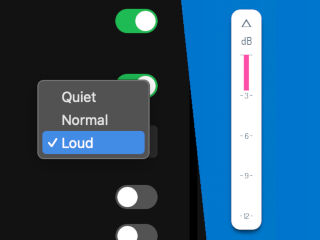
When Spotify users select the "Loud" volume preference, quieter songs are turned up and a limiter steps in to prevent clipping. Until now, you had no way to hear what that limiter was actually doing to your music before uploading.
Loudness Penalty 2 emulates the limiter in Preview mode and shows you the gain reduction in realtime. Click the delta button to hear only what's being removed. Decide whether you're happy with the result before anyone presses play.
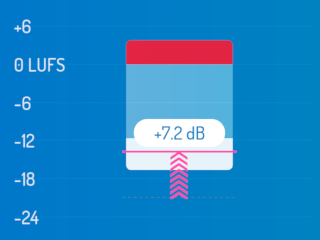
The new block view shows you your music's max true peak, integrated loudness, and loudness range in real time. In Preview mode, it also shows how your music's gain will be adjusted by each streaming service, and what impact that will have on the overall loudness picture. Will your peaks get clipped? Will your song get turned up or down? With the block view, it's easy to see.
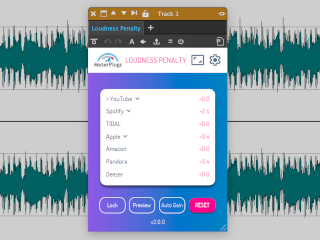
Drag a corner to resize, or pick a preset from the size dropdown in the header. A new compact list view trims the interface down to a single column, small enough to sit beside a busy session but complete enough to give you the numbers you need.

Finally something new and useful in the plugin market! Wytse Gerichhausen (White Sea Studio)

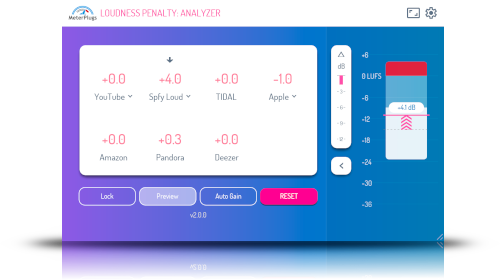
Online streaming services turn down loud music to ensure a more consistent listening experience. The Loudness Penalty plugin tells you how much your music will be turned down by YouTube, Spotify, Apple Music, Amazon, TIDAL, Deezer and Pandora. Now you can have immediate access to this information right in your DAW. Spot the moments that trigger the biggest penalty, and tweak your settings to avoid them, while retaining impactful, punchy playback.

Finally a way to make sure my mixes will rock listening off the Internet! Loudness Penalty lets me know right now what my mix will sound like later on when I listen to them on streaming sites like YouTube, Spotify and TIDAL. This is a super cool plugin! Lij Shaw (Toy Box Studio)
We deliberately chose the name "Loudness Penalty" to be a little provocative, but it is accurate. The louder your music is, the more it will be turned down by online streaming services, to avoid "blasting" listeners with unexpected changes in loudness. Hopefully your music sounds fine, even when it has been turned down, but with Loudness Penalty you can be sure. Preview your music live, and test whether you want to take advantage of the opportunity for more dynamics.

Have you ever been told to upload your music at -14 LUFS, or some other specific value? Don't - it doesn't work! Aiming for "targets" rarely gets the results you're hoping for. Loudness Penalty gives you accurate feedback and lets you preview the result. No more guessing, no more trial and error. With Loudness Penalty, you can optimize and upload your music knowing it will stand head and shoulders against the competition.

The Loudness Penalty website has been a fantastic aid for quickly displaying why I master the way I do. It's great to have this as a plugin now. I've been using Perception and Dynameter on nearly everything I work on, I can see Loudness Penalty being added to my template. Mike Hillier (Metropolis Mastering)


